
Explore the Zoho affiliate program and learn to earn recurring commissions. Our guide covers sign-up, payouts, and proven strategies for success in 2026.
A Practical Guide to Integration with Shopify for Growth
A Practical Guide to Integration with Shopify for Growth

by Mayur
0
0
Setting up a smart integration with Shopify isn't just a technical task; it's one of the smartest growth moves you can make. Think of it as connecting a series of powerful apps to your store that work together to automate workflows, create personalised experiences for your customers, and set you up to scale efficiently. This is how you transform a basic online shop into a well-oiled, growth-focused machine.
Why Smart Shopify Integration Is a Game Changer
Connecting third-party tools to your Shopify store is like hiring a team of specialists who work for you around the clock. Instead of you manually wrestling with every little thing—from sending out marketing emails to keeping inventory updated—you plug in apps that handle all that heavy lifting. For a solo entrepreneur or a small team, this is the secret to punching above your weight and competing with bigger players.
This approach creates a seamless ecosystem where every part of your business talks to each other. Imagine this: a customer makes a purchase, and that single action automatically triggers a thank-you email sequence, updates your accounting software, and pings your fulfilment partner. This frees you up to focus on the things that actually grow your business, like developing new products and talking to your customers.
Building a Scalable Business Machine
The real magic of a well-thought-out integration with Shopify is how it prepares you for growth. As your order volume increases and your customer base expands, these automated systems just keep working. They can handle the extra load without you needing to put in more hours.
Here’s what that looks like in practice:
Automation: You can say goodbye to tedious, repetitive work. Think abandoned cart emails that send themselves or shipping labels that are generated automatically.
Personalisation: You can easily segment your customers and send them messages that actually resonate. By targeting them based on their behaviour, you'll see a real impact on your conversion rates.
Efficiency: Everything feeds into one central hub. You get a crystal-clear view of your business performance without having to log in and out of a dozen different platforms.
A well-integrated Shopify store doesn't just sell products; it builds relationships and drives revenue on autopilot. It’s the difference between running a hobby and building a scalable, long-term asset.
This whole process can be broken down into a simple flow: automate your operations, use that efficiency to personalise customer interactions, and then watch your business scale.
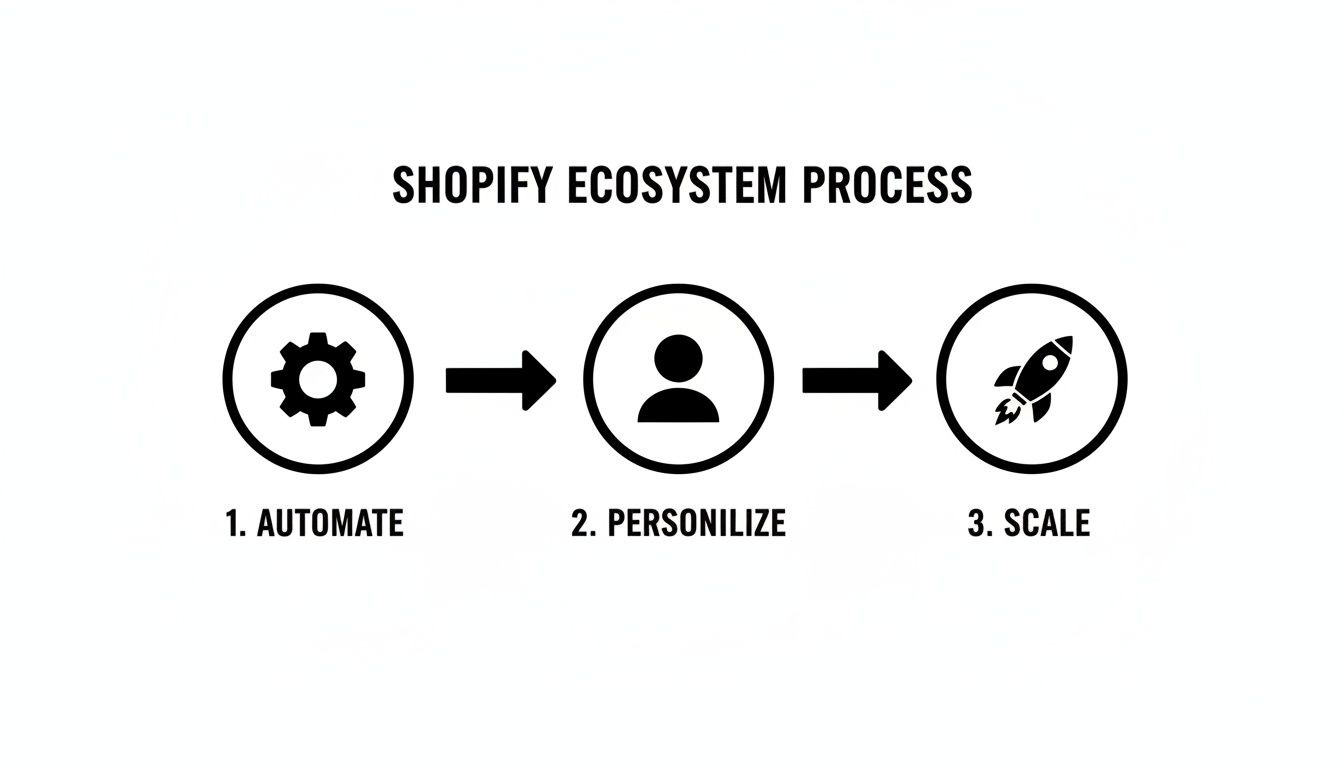
As you can see, it’s a natural progression. You start by shoring up your operational efficiency, which then gives you the bandwidth to focus on customer-centric marketing—the real engine for sustainable growth.
The power of this model is being felt globally. Just look at India, which has become a major hub for Shopify entrepreneurs. There are 90,239 active stores, with 31,845 new ones popping up in just one year. This boom shows just how effective these integrations are at empowering small businesses to launch, operate, and grow.
Key Shopify Integration Areas for Growth
To get started, it helps to know which areas will give you the most bang for your buck. I've put together a quick table outlining the essential integration categories every new store owner should focus on for immediate impact.
Focusing on these core areas first will help you build a solid foundation. You can always add more specialised tools as your business needs evolve.
To dive deeper into the specific apps and tools you can use, check out our dedicated Shopify integrations page. For more ideas on taking your business to the next level, you might also find our guide on https://mayurnetworks.com/blog/small-business-growth-strategies helpful.
Connecting Your Email Marketing Platform
Moving beyond your shop's basic order confirmations is your first real step towards building lasting relationships with your customers. An email marketing integration with Shopify isn’t just about blasting out newsletters; it’s about setting up automated conversations that drive sales while you're busy running your business. This is how you turn one-time buyers into a genuine community.
Platforms like Klaviyo or Mailchimp plug directly into your Shopify data, which opens up some incredibly powerful automation possibilities. Picture this: a customer adds a few items to their cart but gets distracted. Instead of that sale vanishing into thin air, your integrated email service can automatically send them a gentle reminder a few hours later. I've seen this one feature alone recover a ton of otherwise lost revenue. It’s a must-have for any serious store owner.
Thankfully, the Shopify app ecosystem makes this setup dead simple. With over 3,800 developers building for the platform, you can find a proven, reliable email marketing app in minutes. These tools are built for quick installation, letting you start building sales funnels and connecting with your audience almost right away.
Building Revenue with Automated Sequences
Once you've got your email platform connected, it's time to build out a few key automated email flows, often called sequences. These are pre-written emails that get sent automatically when a customer takes a specific action, ensuring every message is timely and relevant without you having to lift a finger.
Here are a few essential sequences you'll want to set up from day one:
The Welcome Series: This is your big chance to make a fantastic first impression. I recommend a series of three or four emails for new subscribers. Use them to introduce your brand's story, show off your best-selling products, and maybe even offer a small discount to encourage that first purchase.
Abandoned Cart Reminders: Like I mentioned, this is your safety net. A simple sequence of two or three reminder emails can bring back a huge percentage of would-be lost sales. It’s easily one of the highest-return automations you can create.
Post-Purchase Follow-up: Don’t let the conversation stop once the order is placed. A week or two after a customer gets their order, send a friendly email asking for a review or suggesting products that go well with what they bought. For example, if they bought a new skincare cleanser, you could automatically suggest your best-selling moisturiser.
Your email list is one of the most valuable assets your business has, because you actually own it. Unlike social media, it's a direct line to your customers that isn't at the mercy of some algorithm. Nurturing it is the key to long-term growth.
Using Segmentation for Targeted Offers
The real magic of a smart email integration with Shopify is segmentation. It’s a fancy word for a simple idea: dividing your audience into smaller, more specific groups based on what they do and what they’ve bought. When you send targeted offers to these specific groups, your marketing becomes so much more effective.
For instance, you could create a segment of customers who have spent over ₹10,000 and send them exclusive VIP offers. Or you could target customers who haven't purchased in six months with a special "we miss you" discount. This level of personalisation makes people feel seen and valued, which dramatically increases the odds they'll come back and buy from you again. For a deeper look, check out our guide on email marketing best practices to really sharpen your strategy.
Integrating Payment Gateways and Financial Tools
Getting your checkout process right is absolutely essential. Think of it as the final handshake in a deal—if it's clumsy, the whole thing can fall apart. Your payment gateway integration with Shopify isn't just a technical box to tick; it’s the last, crucial step in your customer's journey, and it can make or break a sale.
Offering the right payment options builds immediate trust and is one of your best weapons against cart abandonment.
While Shopify Payments is a solid starting point, branching out can open your store to a much wider, even global, audience. When you integrate trusted names like Stripe or PayPal, customers see a familiar face and feel more comfortable handing over their details. If you're selling higher-priced items, a "buy now, pay later" service like Klarna can be a game-changer, making those bigger purchases feel much more manageable for your customers.

This is doubly true for anyone shopping on their phone. With most Shopify traffic now coming from mobile devices, a clunky payment process is a guaranteed way to lose sales. It’s a tough crowd out there—average mobile conversion rates often hover below 2%. However, the best-performing stores can see that number climb past 3.9%, which shows just how much opportunity there is if you get the experience right.
Connecting Your Accounting Software
Once the money starts coming in, you need a smart way to track it. Manually punching sales data into a spreadsheet isn't just tedious; it's a recipe for costly mistakes. This is where connecting accounting software like Xero or QuickBooks can completely change the game, especially if you're running the show solo.
A proper integration automatically pulls all your sales, refunds, and fees from Shopify straight into your accounting platform. It neatly organises everything, which not only makes tax time a breeze but also gives you a crystal-clear, real-time snapshot of your business's financial health. Think about the hours you'll save on bookkeeping—that's time you can pour back into marketing, product development, and actually growing your brand. This kind of automation is a cornerstone of building a business that can scale. To dig deeper into this, have a look at our guide on financial planning for entrepreneurs.
Integrating your financial tools isn't just about saving a few minutes. It’s about building a reliable, automated system that gives you the clarity to make smart decisions and focus on what truly matters: growth.
Choosing the Right Financial Tools
So, which tools should you choose? The best setup really depends on your specific business and who you're selling to. Here are a few things I always tell clients to consider:
Transaction Fees: Get into the weeds on pricing. Compare the fee structures of different gateways—some charge a flat rate, while others use a percentage-plus-fixed-fee model. It might seem small, but it adds up.
Global Reach: Selling internationally? Make sure your gateway supports multiple currencies and is a popular choice in the countries you’re targeting.
Ease of Use: Your accounting software should work for you, not the other way around. Most modern platforms have intuitive dashboards that you don't need an accounting degree to figure out.
By being thoughtful about these financial integrations, you're building a rock-solid foundation for your store. It's what allows you to grow without getting tangled up in administrative headaches. It’s a critical step in building a business that’s not just profitable, but sustainable for the long haul.
Automating Your Fulfilment and Shipping
When your store starts to take off, you’ll quickly find that managing orders by hand is one of the biggest hurdles to growth. A smart fulfilment integration with Shopify is your key to scaling up without getting buried under a mountain of shipping labels and packing tape. This is how you build a business that can genuinely run from anywhere, freeing you up from being physically tied to a stockroom.
At its core, this means connecting your store to shipping carriers or third-party logistics (3PL) providers. These integrations automatically pull order details right out of Shopify, taking care of everything from printing shipping labels to sending tracking updates to your customers. It's a fundamental move towards creating a more hands-off, efficient operation.
The need for this kind of automation is exploding. In fact, Shopify's powerful integrations have helped drive a 35% year-over-year jump in live stores across Asia Pacific, with India leading the charge. This boom shows just how vital automated fulfilment is for modern entrepreneurs. You can dig into more of these trends by checking out the latest Shopify statistics.
Choosing the Right Fulfilment Partner
First things first, you need to decide how you're going to get your products to your customers. This choice dictates the kind of integration you'll need. Will you be shipping orders yourself from your home office, or will you partner with a 3PL service that handles all the storage, picking, packing, and shipping for you?
Here’s a quick rundown to help you figure it out:
Self-Fulfilment: This is a great starting point when you have a manageable order volume. You'll integrate with shipping carriers directly or use an aggregator app like Shiprocket. This approach automates the label printing and tracking but leaves the physical packing and shipping in your hands.
Third-Party Logistics (3PL): When you're ready to scale, a 3PL is your best bet. A 3PL partner takes over your entire inventory and fulfilment process. New orders from your Shopify store go straight to their warehouse, and they handle the rest. This is true automation.
The right fulfilment integration does more than just save you time—it directly impacts your customer experience. Fast, accurate shipping and automated tracking updates build the kind of trust that earns you repeat business.
Setting Up Your Shipping Integration
Once you’ve picked your partner, getting set up is usually quite simple. Most major fulfilment services have dedicated apps right in the Shopify App Store. For instance, integrating with a service like Shiprocket just means installing their app, linking your account, and tweaking your shipping settings.
The system will then sync up your product catalogue and inventory levels automatically. As soon as a new order hits your store, it gets pushed straight to your fulfilment dashboard. From that single screen, you can process shipments in bulk, print all your labels, and kick off automated tracking emails without ever having to manually copy and paste a single address.
This is the kind of automation that's essential for improving operational efficiency and lets you reclaim your time to focus on actually growing your business. That seamless flow is what a scalable ecommerce machine is all about.
Getting Smart with Analytics and Social Tracking
Guessing what your customers want is a recipe for disaster. Knowing is what separates a struggling shop from a thriving one. This is where integrating the right analytics tools with your Shopify store becomes your secret weapon, turning raw visitor data into smart business decisions that actually grow your bottom line.
Your first move should always be setting up Google Analytics. It’s a powerful (and free) way to get a clear picture of your store's performance. Once connected, you can see exactly where your traffic is coming from, what products people are looking at, and at what point they’re leaving your site. This kind of information is priceless.
Connecting Social Media Tracking Pixels
Beyond your website’s overall performance, you need to know if your social media ads are actually working. That's where tracking pixels come into play. A pixel is just a small piece of code from platforms like Meta (for Facebook and Instagram) or TikTok that you add to your Shopify store.
This simple bit of code creates a powerful link between your social ads and actual sales. Imagine you’re a content creator running ads for a new product. The pixel will tell you precisely which TikTok video or Instagram post led to a purchase. It removes all the guesswork, so you can confidently invest more in the ads that convert and stop wasting money on the ones that don't.
If you’re diving into social commerce, the Instagram and TikTok Pixels are non-negotiable. Think about this: in one recent month, India drove a massive 20.8 million visits to Shopify stores, placing it second only to the US. A huge chunk of that traffic is coming from social media, and pixels are how you track and make the most of it.
Your data tells a story about your customers. Integrating analytics tools is how you learn to read that story and use it to write a more profitable future for your business. It’s about making smarter, faster decisions based on real behaviour.
Making Sense of the Data
Once everything is connected, the real work begins: turning numbers into action. It's easy to get overwhelmed by all the data, so focus on a few key metrics that truly reflect the health of your business.
Here are a few essential data points to keep an eye on:
Conversion Rate: This is the big one. What percentage of visitors actually buy something?
Average Order Value (AOV): How much do customers typically spend in a single transaction? Nudging this number up is a quick win for your revenue.
Customer Acquisition Cost (CAC): How much do you spend on marketing to get one new customer? This number must be lower than your average profit per customer.
Getting a handle on these numbers is your starting point. For a complete walkthrough, our guide on how to use Google Analytics will show you the ropes. By transforming your social feeds into measurable sales funnels—for instance, by selling on Instagram with Shopify—you build a far more resilient and profitable business.
Common Questions About Shopify Integrations
Jumping into the world of app integrations can feel a bit overwhelming. You start wondering about costs, whether all these apps will slow down your store, and if you need to be a coding whiz to get it all working. These are totally normal questions, so let's break them down.

The first thing most new store owners worry about is the cost. It’s true, many premium apps have a monthly fee, but the Shopify App Store is also packed with fantastic tools that have generous free plans. You can absolutely get your email marketing, basic analytics, and even some shipping automations set up without spending a single rupee.
My advice? Start with the free versions. This is the best way to test drive the features and see what actually moves the needle for your business before you open your wallet. As your store grows and your needs become more complex, you can always upgrade to a paid plan to get the more advanced features.
Will Too Many Apps Slow Down My Store?
This is a big one. And yes, it’s a valid concern. Site speed is everything for user experience and conversions. The short answer is that poorly built or excessive apps can slow down your site. The key isn't to avoid apps, but to be smart about which ones you install.
A well-coded app from a reputable developer is designed to have a minimal impact on your store’s performance. Think about it—the developers of popular apps have a huge incentive to keep their software fast and light.
Here are a few tips I've learned for keeping my stores running smoothly:
Choose Wisely: Always look for apps with a solid number of positive reviews. See what other merchants are saying; it's often the most honest feedback you'll get on an app's quality and performance.
Do Regular Audits: Every few months, go through your installed apps. If you aren't using something, uninstall it. Don't let old, unused code just sit there.
Focus on Impact: Prioritise integrations that either make you money or save you a ton of time. An app that recovers 15% of your abandoned carts is almost certainly worth a minuscule trade-off in load time.
Think of your apps like a specialised pit crew for your business. You only need the ones that make the car go faster or run more reliably. Anything else is just extra weight.
How Technical Do I Need to Be?
Honestly, not very. That’s the real beauty of the Shopify ecosystem. Most integrations are built for people who are great at business, not necessarily at coding. The vast majority of apps on the Shopify App Store are installed with just a click.
For most tools, the process is incredibly straightforward:
Find the app you want in the App Store.
Click the "Add app" button.
Follow the simple, on-screen wizard to grant permissions and tweak a few basic settings.
You almost never have to touch a single line of code. Developers have made their tools as plug-and-play as possible because they know their users are entrepreneurs. If you can follow a simple checklist, you have all the technical skill you need to create a powerful, automated store.
Ready to build your own profitable online business from the ground up? At Mayur Networks, we provide the step-by-step training, tools, and community support to help you launch and scale. Join our community for free and start your journey today!
Leave a Comment 👋
Leave a Comment 👋
0 Comments
Want to Build Your Digital Hub?
Want to Build Your Digital Hub?
Learn How To Launch Your Own Wildly Profitable Digital Hub In Just 7 Days.
Learn How To Launch Your Own Wildly Profitable Digital Hub In Just 7 Days.

Similar Posts
Similar Posts
